
MT5 ManagerMT5 Manager

Manage Many MT5 Accounts on One Dashboard — Run Right on Your Machine
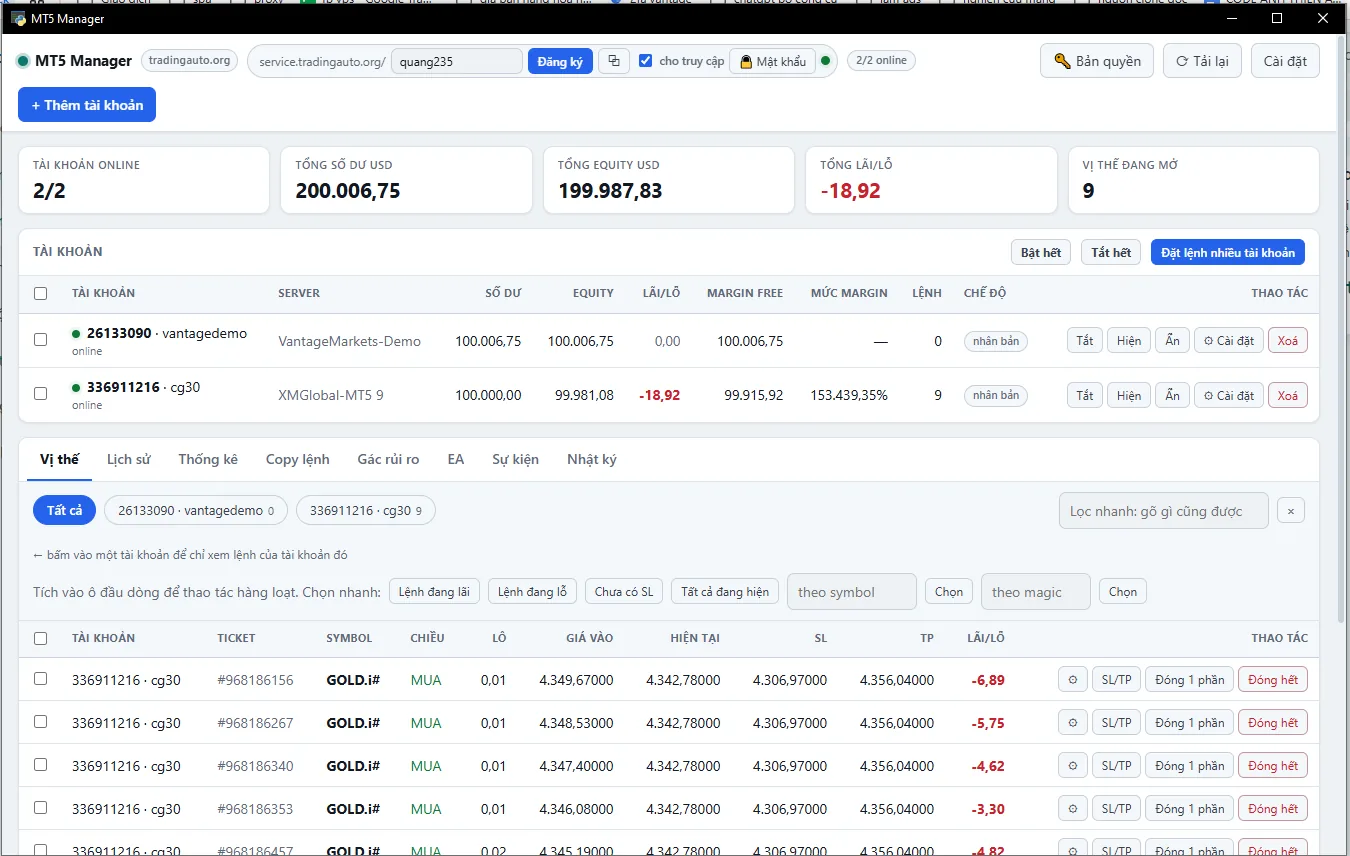
MT5 Manager — Remote Account Manager for MetaTrader 5

Download

Version
1.0
Format
exe
Operating system
Windows 10/11 — cần MetaTrader 5 cài sẵn
Download the installer Free download — license key required to run on real account
One board for everything — balance, equity, P/L and open positions of every account, refreshed about once a second.
Free — One Slot Per tradingauto.org Account
  • Sign up an account on this site and you get one slot right away, no key needed.
  • Unlimited number of MT5 accounts to manage
  • Only one run on one machine at one time
Before You Start
  • OS: Windows only (macOS and Linux not yet supported)
  • Required: MetaTrader 5 installed on the machine — the tool controls the real terminal, cannot replace it.
  • Should have: one clean MT5 build to clone from. The tool scans automatically, even inactive builds.
  • Machine must be on: everything runs on your machine, turn the machine off means you stop managing.

One Interface for All Accounts

Each MT5 account is cloned into its own terminal, logs in and runs hidden. You see one dashboard: balance, equity, margin, P/L, and all positions of all accounts. The clone is yours — open it and build charts or attach EA as you like, the tool does not touch charts or EA.

P/L and current price for each order update about once per second, pushed by the server instead of the browser asking constantly.

🎯 Manage Orders
  • Place orders in many accounts in one click, with magic and comment fields.
  • Close 1 part — KEEP the magic and comment of the rest
  • Set SL/TP by price or by MONEY, no pip conversion needed.
  • Break-even and trailing automatically tighten only, never loosen
  • Pick a group: profit, loss, no SL, by symbol, by magic
  • Quick filter box: type any part and it matches right away.
🛡️ Risk Guard
  • Threshold by daily loss, drawdown from peak, or margin level
  • Three response levels: alert only · close all · close all then disable account
  • Set lockout after exit, no stacking orders
  • Every activation goes into the log — you have proof to look back.
🔁 Copy Orders Internally
  • One leading account, many following accounts — on your own machine
  • Can copy BETWEEN TWO DIFFERENT BROKERS: finds symbol names, strips suffixes automatically
  • Cards linked by magic stay linked even if you close part of them
  • Any positions that existed before you turned it on are skipped, not reverse-copied.
🤖 Bulk EA
  • Install one EA or preset into many accounts at once
  • Attach EA to chart at startup, with symbol, timeframe and .set file
  • Clone inherits EA from the source build

View and Control Remotely

Toggling one switch gives you a private address like service.tradingauto.org/your-name, accessible from a phone anywhere. No port forwarding, no router config, no static IP needed — your machine connects OUT to a relay server, no connections come IN to yours.

Real tunnel latency: roughly 68 milliseconds per round-trip.

Four Layers of Protection for Remote Access
  • Login page only asks for password. — does not ask for license key, because the private address is already your identity. The tool NEVER asks for the key on a remote page; anyone asking is fake.
  • Two-factor authentication — up to you — use Google Authenticator or equivalent.
  • IP block list of your own — Anyone who logs in wrong many times gets blocked right at the relay server, cannot reach your machine. You have full control to unblock.
  • Auto-logout — after time without activity, with a hard limit of 12 hours.

License, password change, and IP block list management can only be done from the machine itself — someone who got in remotely cannot unblock themselves either.

Stats and Alerts

  • Profit by day, by month, by weekday
  • P/L line, cumulative, filter by account, symbol, magic or comment.
  • Export CSV to recalculate with Excel
  • Telegram alerts go DIRECTLY from your machine, not through any server of ours.
State Limits Plainly
  • Windows only
  • Must have MetaTrader 5 on the machine — the tool controls the real terminal, it does not replace it.
  • Machine off or network down means you stop managing; risk guard and order copying stop too.
  • Each terminal can have one EA at startup. For multiple EA, open a clone yourself and drag manually.
  • The tool helps manage, it does NOT predict markets and does not guarantee profit. Every trading decision is yours.